A technical SEO checklist for 2026 makes sure search engines and AI crawlers can reach, render and index every important page. Check robots.txt and sitemaps, fix status codes and canonicals, pass Core Web Vitals on mobile (LCP 2.5 s, INP 200 ms, CLS 0.1), add accurate structured data, set hreflang and decide which AI bots to allow.
I am Ujjwal Rupakheti, a full-stack developer and SEO specialist in Itahari, Nepal. I write the code for the sites I optimise, so this checklist is written the way a developer works: from the server outwards. Each section starts with the answer, then gives the checks and the fixes.
The examples use plain HTML and common frameworks, but the rules are the same for WordPress, Next.js or a custom build. If you run WordPress, my WordPress SEO guide for Nepal covers the platform-specific settings.
How Should You Use This Technical SEO Checklist?
Work from the bottom up. A page that cannot be crawled will not be indexed, and a page that is not indexed cannot rank, however fast it is. So fix crawling first, then indexing and rendering, then speed and structured data. Each layer depends on the one beneath it.
- Crawling · robots.txt, sitemaps, status codesStart here
- Indexing · canonicals, noindex, duplicates
- Rendering · content in the server HTML
- Speed · Core Web Vitals on mobile
- Structured data · and AI crawler accessLast
For each item, record pass, fail or not applicable, with the URL or template where the problem appears. Fix template-level problems first, because one change there fixes hundreds of pages. The full checklist table at the end of this article is ready to copy.
1. Can Search Engines Crawl Your Site?
Crawling is the first gate. Check that robots.txt allows your important sections, that your XML sitemap lists only live, canonical, indexable URLs, and that every important page returns a 200 status code. Then make sure important pages are reachable through normal HTML links, not only through search boxes or scripts.
robots.txt
Keep robots.txt short. Block private or endless areas, such as admin screens, internal search results and cart pages. Do not block CSS or JavaScript files that pages need to render. Here is a clean starting point for a small site:
User-agent: *
Disallow: /admin/
Disallow: /search
Disallow: /cart

Sitemap: https://www.example.com.np/sitemap.xml
Google does not support the crawl-delay directive, so do not rely on it to control Googlebot.
XML Sitemaps
- Include only URLs that return 200, are indexable and are their own canonical.
- Keep
lastmodaccurate. Google uses it when it is reliable and ignorespriorityandchangefreq. - Split large sites into several sitemaps by type, such as pages, posts, products and images.
- Submit the sitemap in Search Console and Bing Webmaster Tools, and reference it in robots.txt.
Status Codes
Crawl the whole site with a tool such as Screaming Frog. Fix internal links that point to 404 pages or to redirects. Return a real 404 or 410 for pages that are gone, not a 200 page that says “not found”, which Google treats as a soft 404. My SEO tools guide covers the free crawlers that do this.
2. Are the Right Pages Indexed, and Only Once?
Indexing is Google’s decision about which URLs to keep. Your job is to send consistent signals: one URL per piece of content, a self-referencing canonical tag, no accidental noindex, and internal links that all point to the canonical version. Then check the Pages report in Search Console to see what Google actually chose.
- Canonical tags: every indexable page should have
<link rel="canonical" href="...">pointing to its own clean URL. Google treats canonicals as a strong hint, not a command. - One host: redirect
httptohttps, and non-wwwtowwwor the reverse, with a single 301 hop. - Parameters: tracking parameters such as
?utm_source=and sort or filter parameters should canonicalise to the clean URL. - Thin pages: tag archives, empty categories and paginated duplicates should be noindexed, merged or improved.
- Trailing slashes: pick one form and redirect the other.
In the Pages report, read the reasons carefully. “Crawled, currently not indexed” usually points to thin or duplicate content. “Duplicate, Google chose different canonical than user” means your signals disagree with each other.
3. Can Google See Content That JavaScript Loads?
Google renders JavaScript, but it does so after crawling, with limited resources, and some AI crawlers do not run JavaScript at all. The safe rule is simple: important text, links, titles, canonicals and structured data should be in the HTML the server sends, not added later in the browser.
Use server-side rendering or static generation for public pages. Frameworks such as Next.js do this by default. Test a page with the URL Inspection tool in Search Console and compare the rendered HTML with what users see. Links must be real <a href> elements, because Google does not follow click handlers.
4. Is Your Site Architecture Easy to Follow?
A clear architecture puts every important page within a few clicks of the home page, groups related pages together and links them with descriptive anchor text. This helps users, spreads link value through the site and tells search engines which pages matter most.
- Use short, readable URLs in lowercase, with hyphens, such as
/local-seo/. - Add breadcrumbs, both visible and as
BreadcrumbListstructured data. - Link guides to the services they support, and services to their case studies.
- Find orphan pages, which no internal link points to, and either link them or remove them.
5. Does the Site Pass Core Web Vitals in 2026?
Core Web Vitals measure real users’ loading speed, responsiveness and visual stability. A page passes when, at the 75th percentile, LCP is 2.5 seconds or less, INP is 200 milliseconds or less and CLS is 0.1 or less. INP replaced First Input Delay (FID) in March 2024, so any guide still listing FID is out of date.
LCP · Loading
≤ 2.5 s
Largest Contentful Paint. Needs work up to 4 s.
INP · Responsiveness
≤ 200 ms
Interaction to Next Paint. Needs work up to 500 ms.
CLS · Stability
≤ 0.1
Cumulative Layout Shift. Needs work up to 0.25.
| Metric | Good | Common causes | Typical fixes |
|---|---|---|---|
| LCP (Largest Contentful Paint) | 2.5 s or less | Large hero images, slow server, render-blocking CSS | Compress and size the hero, fetchpriority="high", never lazy-load it, use a CDN |
| INP (Interaction to Next Paint) | 200 ms or less | Heavy JavaScript, long tasks, third-party widgets | Remove unused scripts, split long tasks, defer chat and tracking tags |
| CLS (Cumulative Layout Shift) | 0.1 or less | Images without size, late ads or banners, web fonts | Set width and height, reserve space, use font-display: swap |
Use field data first. PageSpeed Insights shows real-user data from the Chrome UX Report when your site has enough traffic. Many small Nepali sites do not, so you will see lab data from Lighthouse instead. Lab data is useful for finding causes, but it is not what Google uses to judge the page.
Speed is a signal, not the whole storyCore Web Vitals are a ranking signal, but relevance matters more. A fast page with a weak answer will still lose to a slower page with a better one. My step-by-step SEO guide covers the content side.
6. Does the Site Work on Mobile and on Nepali Networks?
Google indexes the mobile version of every site, so the mobile page is the page that ranks. Check that it has the same content, links and structured data as desktop, that text is readable without zooming, and that buttons are easy to tap. Then test on a slow connection.
In Nepal, many visitors use mid-range Android phones on mobile data. Throttle Chrome DevTools to a slow 4G profile and load your key pages. Devanagari fonts are large files, so load only the weights you use, subset them where possible, and preload the one used above the fold. Every unused script matters more on a slow phone.
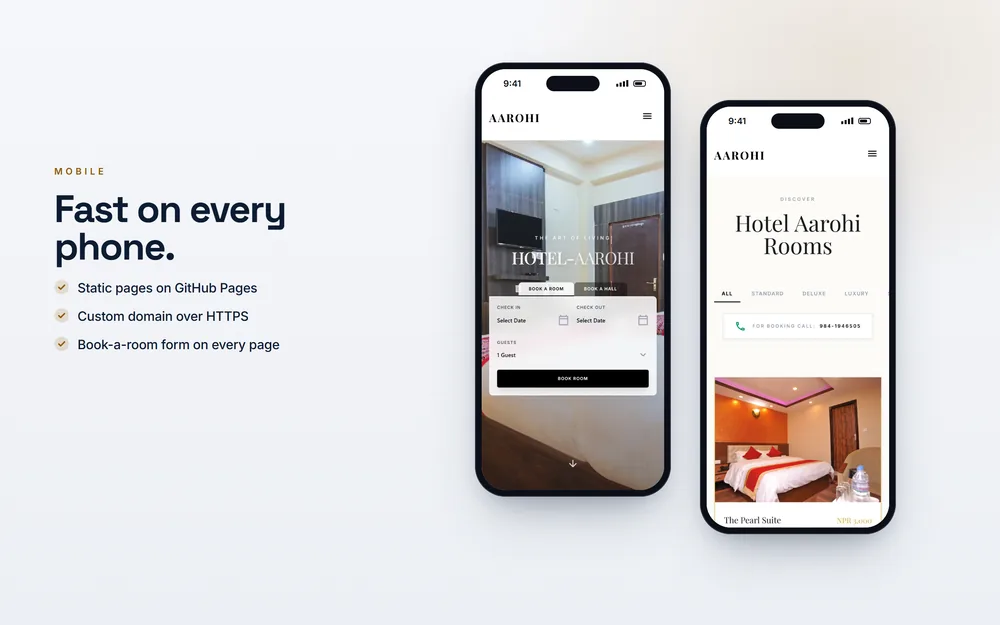
Case study: Hotel AarohiA static hotel website on GitHub Pages, built to load fast on rural mobile connections, with Hotel structured data.
7. Are HTTPS, Security Headers and Redirects Correct?
Every page should load over HTTPS with a valid certificate, with no mixed content, and every old URL should reach its new home in one 301 redirect. Redirect chains and loops waste crawl effort and slow users down. HTTPS is a light ranking signal, and browsers warn users away from sites without it.
- Enable HSTS once HTTPS works everywhere.
- Add sensible security headers such as
X-Content-Type-Optionsand a Content Security Policy. - After a redesign or migration, map every old URL to its closest new page before launch.
- Keep redirects for at least a year, and update internal links to point straight at the final URL.
8. Is Your Structured Data Accurate and Useful?
Structured data in JSON-LD labels the things on your page, such as the organisation, the article, its author, a product or a local business. Use types that match visible content, connect them with @id values, and test them. Accurate markup earns rich results where Google still offers them and helps AI tools connect your pages.
Know what still shows in search. Product, review snippets for eligible types, breadcrumbs, organisation logos, events and local business details still produce rich results. FAQ rich results are limited to a small set of authoritative government and health sites since 2023, and HowTo rich results were removed the same year.
<script type="application/ld+json">
{
  "@context": "https://schema.org",
  "@type": "BlogPosting",
  "headline": "Technical SEO Checklist 2026",
  "datePublished": "2026-05-28",
  "dateModified": "2026-11-03",
  "author": {
    "@type": "Person",
    "name": "Ujjwal Rupakheti",
    "url": "https://www.ujjwalrupakheti.com.np/author/ujjwal-rupakheti/"
  }
}
</script>
Never mark up what is not on the pageNever mark up reviews, ratings or prices that are not on the page. Self-serving review stars on your own business pages are not eligible, and fake ratings can lead to a manual action.
9. Do Your Nepali and English Pages Use Hreflang Correctly?
If you publish the same content in Nepali and English, or for Nepal and other countries, hreflang tells Google which version to show to which user. Every version must list every other version and itself, with return links on each page, and an x-default for everyone else.
<link rel="alternate" hreflang="ne-NP" href="https://www.example.com.np/ne/" />
<link rel="alternate" hreflang="en-NP" href="https://www.example.com.np/" />
<link rel="alternate" hreflang="x-default" href="https://www.example.com.np/" />
Use Unicode text for Nepali, not text inside images. Keep URLs in English or romanised Nepali where you can, because Devanagari URLs turn into long percent-encoded strings when shared.

10. Which AI Crawlers Should You Allow?
AI companies use separate crawlers for model training and for live search. If you want to be cited in AI answers, allow the search crawlers and decide separately about training crawlers. Check your server logs to see which bots visit, and check each company’s documentation, because user agents change.
| User agent or token | Company | Used for |
|---|---|---|
| Googlebot | Search, including AI Overviews | |
| Google-Extended | A robots.txt token that controls use in Gemini models; it does not affect Search | |
| Bingbot | Microsoft | Bing search and Copilot answers |
| OAI-SearchBot | OpenAI | ChatGPT search results |
| GPTBot | OpenAI | Model training |
| ClaudeBot | Anthropic | Model training |
| PerplexityBot | Perplexity | Perplexity search index |
# Allow AI search, block AI training (example)
User-agent: OAI-SearchBot
Allow: /

User-agent: GPTBot
Disallow: /
On my product Nimtto (live at nimtto.com), the robots file allows GPTBot, ClaudeBot and PerplexityBot, and an llms.txt file describes the product for AI assistants. llms.txt is a proposed convention; no major search engine has confirmed using it, so treat it as optional.
11. How Do You Monitor Technical SEO After the Fixes?
Technical SEO breaks quietly: a plugin update adds noindex, a redesign drops redirects, a new script slows every page. Check the Search Console Pages, Sitemaps and Core Web Vitals reports monthly, crawl the site after big releases, and add a few checks to your deployment process so problems are caught before launch.
- Set up email alerts in Search Console and Bing Webmaster Tools.
- Keep a list of key URLs and test their status code, title, canonical and robots tag in CI.
- Review server logs every few months to see how Googlebot actually spends its time.
- Re-run a full audit after any migration, theme change or CMS upgrade.
For a client site, I usually do this as part of a technical SEO audit and then hand over a short monitoring routine. If you are rebuilding the site anyway, I can build these checks in from the start as your web developer.
Want This Checklist Run on Your Site?My technical SEO audit starts from NPR 15,000 and takes about a week. You get a prioritised list of fixes, and because I am a developer, I can make them in your code too.
Book an auditThe Full Technical SEO Checklist for 2026
Copy this table into a sheet and mark each row pass, fail or not applicable. Fix failures from the top down, because the early rows block everything below them.
| Area | Check | Where to test |
|---|---|---|
| Crawling | robots.txt allows key sections and CSS and JS files | robots.txt report in Search Console |
| Crawling | Sitemap lists only 200, indexable, canonical URLs | Sitemaps report, crawler |
| Crawling | No internal links to 404s or redirects | Screaming Frog |
| Indexing | Self-referencing canonical on every indexable page | URL Inspection, crawler |
| Indexing | One host and protocol, single 301 hop | Browser, crawler |
| Indexing | No accidental noindex; thin pages handled | Pages report |
| Rendering | Main content and links in server HTML | URL Inspection, view source |
| Architecture | Key pages within three clicks; no orphans | Crawler |
| Speed | LCP 2.5 s, INP 200 ms, CLS 0.1 on mobile | PageSpeed Insights, Core Web Vitals report |
| Mobile | Same content on mobile; readable; tappable | Chrome DevTools, real phone |
| Security | HTTPS everywhere, no mixed content, HSTS | Browser, headers check |
| Structured data | Valid, matches visible content, linked by @id | Rich Results Test |
| Languages | hreflang with return links and x-default | Crawler |
| AI crawlers | Search bots allowed; training bots by choice | robots.txt, server logs |
| Monitoring | Alerts on; monthly report review | Search Console, Bing Webmaster Tools |
Technical work is only one part of SEO. For keywords, content, links and local search, read my step-by-step SEO guide, set up your Google Business Profile, or see all my services. For what an audit costs in Nepal, see my SEO cost guide.

About the author
Ujjwal Rupakheti
I am a full-stack web developer and SEO specialist based in Itahari, Koshi Province, Nepal. I have worked in web development and SEO since 2022 and have published more than 200 SEO-optimised articles across five-plus domains. Since June 2026 I have been a full-stack web developer at Ektukra Digital Agency, after a year there on SEO content strategy and QA testing.