To set up a Google Business Profile in Nepal, prepare a consistent name, address and phone number that match your PAN or VAT papers, create the profile at business.google.com, and complete video verification by filming your street, signage, premises and proof of business in one take. Then choose precise categories, add photos and services, and collect genuine reviews.
If you run a business in Nepal, many of your customers find you through Google Maps. They search “dentist near me”, “hotel in Dharan” or “laptop repair Itahari” and call one of the first three businesses they see. Those three slots come from Google Business Profile, not from your website alone.
Creating a profile takes about ten minutes. Getting it verified, keeping it safe from suspension and making it rank is where most business owners in Nepal get stuck. I am Ujjwal Rupakheti, a web developer and SEO specialist in Itahari, and this guide walks through each step, with the problems that come up most often here.
What Does a Google Business Profile Do for a Nepali Business?
A Google Business Profile is your free listing on Google Search and Google Maps. It shows your name, location, hours, phone, photos and reviews, and it decides whether you appear in the local map pack. For searches with local intent, the map pack often appears above the normal website results.
| Feature | Without a verified profile | With a complete, verified profile |
|---|---|---|
| Map visibility | Rarely shown for “near me” or town searches | Eligible for the map pack and Maps results |
| Contact | Customers hunt for a number on your website | One-tap call and directions from the result |
| Trust | Missing or user-edited details, no reviews | Your own hours, photos, services and replies to reviews |
| AI answers | Little structured data for AI tools to use | Clear facts that Google’s AI features can draw on |
A profile does not replace your website. The two work together: the profile wins the click in the map, and the website answers the questions that decide whether someone calls. That is why I treat both as one job in my local SEO service.
What Should You Prepare Before Creating the Profile?
Prepare three things before you open the dashboard: one consistent version of your business name, address and phone (NAP), documents that prove them, and a search for any existing listing. Google’s spam filters compare your profile with your website, directories and documents, and inconsistent details are a common trigger for suspension.
Use One Consistent Name, Address and Phone
Use your real business name as it appears on your sign and on your PAN or VAT certificate. If your registered name is “Mantra Digital Services”, do not enter “Mantra Digital Services - Best SEO Company Kathmandu”. Adding keywords to the name breaks Google’s guidelines and is one of the most common reasons for suspension.
Nepali addresses often lack street names and house numbers, so pick one clear format and use it everywhere. A good pattern is landmark or tole, ward number, municipality and district, for example “Gairidhara, Ward No. 2, Kathmandu Metropolitan City, Kathmandu”.
Use a number that belongs to the business and that someone answers during business hours. A landline or a dedicated business mobile works. Avoid temporary SIM cards and personal numbers that you may change later.
Match Your Documents
Google may ask for proof during verification or an appeal. Make sure the name and address on the profile match your PAN or VAT certificate, your company registration from the Office of the Company Registrar, or your local ward registration. If your papers say Lalitpur and your profile says Kathmandu, a reviewer can reject it.
Check for an Existing Listing
Search Google Maps for your business name, phone number and address. A customer or a former employee may already have added your business. If a listing exists, use “Claim this business” or “Own this business?” on it instead of creating a new one. Duplicate profiles for the same place are treated as spam.
How to Create a Google Business Profile, Step by Step
Sign in at business.google.com with a Google account the business controls, add the business name, choose a primary category, enter your location or service area, add your phone and website, and request verification. The whole form takes about ten minutes when your details are ready.
- Use a business-owned Google account. Ideally use an address on your own domain, or a Gmail account the business controls, not a staff member’s personal account. Add a second owner so you never lose access if someone leaves.
- Enter the business name. Type it exactly as on your sign and documents. Google will suggest existing listings; claim one if it is yours.
- Choose the primary category. This is the strongest relevance signal on the profile. Pick the most specific one that describes what you are, such as “Dental clinic” rather than “Health”. You can add up to nine more categories later.
- Add a location or a service area. If customers visit you, enter the address and drag the map pin onto your actual building at full zoom. If you visit customers or work online, choose service-area business and hide the address.
- Add contact details. Enter your phone number and your website. Link to the most relevant page, such as a location page for a branch, not always the home page.
- Request verification. Google chooses the methods offered. In Nepal this is usually a video recording; follow the next section carefully before you press record.
How Does Google Business Profile Verification Work in Nepal?
Google decides which verification method to offer, and for most new profiles in Nepal that is a video recording. You film one continuous, unedited clip that shows where the business is, that it really operates there, and that you manage it. Postcards, where still offered, are slow and often do not arrive.
The video is reviewed by Google, partly automatically. Most rejections I have seen come from videos that start indoors, so the reviewer cannot connect the office to a real street location. Plan the route before you start, check that the phone has good light and battery, and record in one take.
What to Show in the Verification Video
- Start outside. Show the street, a nearby landmark or shop signs, so the location matches the map pin.
- Show your permanent signage. Pan to your sign or name board on the building or door.
- Walk in without cutting. Keep recording as you open the door and enter the premises.
- Show the business operating. Film equipment, stock, a till or POS system, or your work area.
- Show proof of management. Unlock the door or a cabinet, or show your PAN or VAT certificate or another document with the business name.
Tip: leave the profile alone while it is reviewedDo not edit the profile while verification is pending. Changing the name, address or category can restart the review. If the video is rejected, read the reason in the dashboard, fix that specific gap and record again.
Service-area businesses still need to show that they are real. Film your vehicle or tools with branding, your equipment and a business document, since there may be no shopfront to show.
How Do You Choose Categories and Services?
Your primary category tells Google what you are, and it affects which searches you appear for more than any other field. Choose the most specific accurate category as primary, add secondary categories only for real parts of the business, and list each service separately with a short, plain description.
Here is how that looks for a fictional hotel in a small town, similar to the businesses I work with:
| Field | Weak choice | Better choice |
|---|---|---|
| Primary category | Lodging | Hotel |
| Secondary categories | Ten loosely related types | Restaurant, Banquet hall (only if they exist) |
| Services or products | Left empty | Standard room, Deluxe room, Thakali set, Event hall booking, each with a price |
| Description | Keyword list | Two or three sentences on location, rooms and restaurant |
To find the categories competitors use, look at the businesses that already appear in the map pack for your main search. Then check that every service on your profile also has a matching section or page on your website, so both sources agree. If you are not sure which searches matter most, my keyword research service maps them for you.
How Do You Optimise the Profile After Verification?
After verification, complete every section that applies: hours, holiday hours, description, services, products, attributes, photos and opening date. Then keep it active with regular photos and updates. A complete, accurate profile gives Google more reasons to show you, and gives customers fewer reasons to pick someone else.
- Description: up to 750 characters. Say what you do, where, and for whom, in plain language. No links or phone numbers.
- Hours: set regular hours and update them for Dashain, Tihar and other holidays. Wrong hours lead to bad reviews.
- Photos: add a logo, a cover photo, the outside of the building, the inside, your staff and your work. Add new ones regularly.
- Products and services: list your main offers with prices where you can. Prices answer the question most customers have.
- Updates: post offers, events and news. They show recent activity and give people a reason to call.
- Attributes: tick the ones that apply, such as wheelchair access, Wi-Fi or online appointments.
Spot out-of-date adviceGoogle has dropped some older features over time, including the built-in chat and the free Business Profile websites. If a guide tells you to enable messaging on your profile, it is out of date.
How Do You Get More Google Reviews Without Breaking the Rules?
Ask every customer for an honest review, make it easy with a short link or QR code, and reply to every review, good or bad. Google does not allow paying for reviews, offering discounts in exchange, writing reviews for customers, or asking only happy customers while steering unhappy ones away.
The text of reviews matters as well as the stars. A review that mentions the service and the place helps both customers and Google understand what you do. You can remind customers which service they used, but let them write their own words.
“Good service.”
“They replaced my laptop screen in Itahari the same afternoon and explained the warranty clearly.”
Reply within a few days. Thank people by name, mention the service, and answer complaints calmly with a way to fix the problem. Future customers read the replies as much as the reviews.
How Do You Connect Your Website to Your Profile?
Your website should confirm everything on your profile. Show the same name, address and phone on the contact page, embed a Google map, add LocalBusiness structured data with the same details, and give each branch or main service its own page. When the website and profile agree, both rank better.
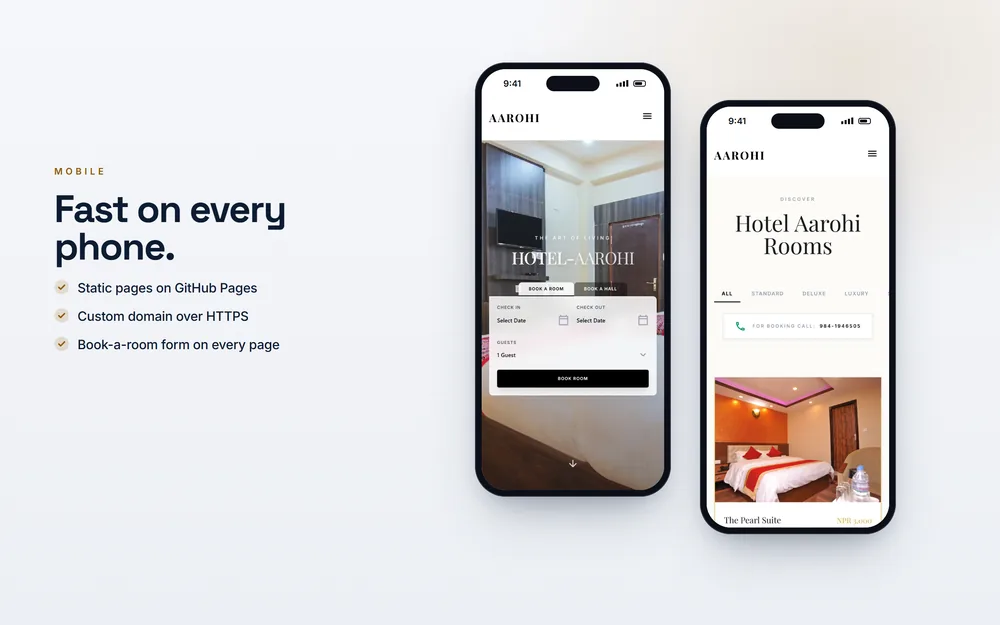
The Hotel Aarohi website I built for a hotel in Chandrapur, Rautahat, follows this pattern. It has landing pages for the searches guests make, such as hotels and Thakali food in Chandrapur, plus Hotel, FAQ and opening-hours structured data, and the booking phone number is visible on every page. You can see it live at hotelaarohi.ujjwalrupakheti.com.np.
If your site does not have pages that match your profile yet, my web development service includes local landing pages and structured data. You can also see how this fits into a wider plan in my guide to doing SEO in 2026, and the WordPress side of local pages in my WordPress SEO guide for Nepal.
How Do You Rank Higher in the Google Map Pack?
Google ranks local results on three things: relevance, distance and prominence. Relevance is how well your categories, services and website match the search. Distance is how far you are from the searcher. Prominence is how well known and trusted you are, from reviews, links, mentions and your website. You can improve two of the three.
Relevance
Choose the most accurate primary category, list every real service, and make sure your website has a page for each main service with the town name used naturally. A dental clinic with a page for braces and another for root canal treatment gives Google two clear matches instead of one vague one.
Prominence
Collect reviews steadily rather than in one burst, and reply to them. Get listed with the same details on directories people in Nepal actually use, your trade association and local news or event pages. Links and mentions from local websites tell Google that your business is known in the area. My link building page covers how to earn those links safely.
Distance
You cannot move your shop, and you should not invent an address closer to the city centre. If you serve a wider area, a service-area profile and website pages for the towns you cover are the honest way to reach those customers.
Several Branches
Each branch with staff and signage can have its own profile. Give each one its own address, a local phone number if possible, its own photos and hours, and a matching location page on your website. Manage them from one account or a business group so you keep control when staff change.
Which Mistakes Get Profiles Suspended?
Most suspensions in Nepal come from a few avoidable mistakes: keywords in the business name, a home address shown as a storefront, duplicate profiles, shared phone numbers, and addresses that do not match the business documents. Google’s filters act automatically, so one wrong field can take a profile down overnight.
Showing a Home as a Storefront
Many freelancers and consultants in Nepal work from home. If customers do not visit, set the profile up as a service-area business and hide the address. Showing a residential address as a public office invites suspension.
Creating a Second Profile
When verification is slow, some owners open a second profile with a slightly different name. Google’s systems often link the two and suspend both. If a profile is stuck, keep working on the original through Google’s support channels.
Sharing One Phone Number
If you own two separate businesses, give each its own phone number. One number across several profiles looks like a lead-generation network to Google’s filters.
Using a Virtual Office or Co-Working Desk
Addresses where you do not have staff during business hours, such as a virtual office or a mailbox, are not eligible. A co-working space is only acceptable when you have a staffed, signed presence there.
How Do You Recover a Suspended Profile?
Do not delete a suspended profile and do not create a new one. Find and fix the cause, collect documents that prove the business is real at that address, and submit a reinstatement request through Google’s official appeal form. Then wait for a reply without editing the profile again.
- Find the cause. Check the name for keywords, the address for accuracy, the categories for fit and the phone for duplication. Fix them first.
- Collect evidence. A clear scan of your PAN or VAT certificate, a recent utility or internet bill in the business name at that address, and photos of your permanent signage and premises.
- Submit the appeal. Use the reinstatement form linked from the dashboard or Google Business Profile Help. Upload the files and write a short, factual note.
- Wait and watch your email. Reviews often take several business days. Answer any follow-up request quickly and with the same details.
A short appeal note can read like this:
Our profile was suspended. We have corrected the business name to match our registration. Attached are our PAN certificate, a recent electricity bill for this address and photos of our signage. Please review and reinstate the profile.
How Do You Make Your Profile Useful for AI Answers and Voice Search?
Google’s AI features and voice assistants answer local questions using your profile, your website and your reviews. Make those facts complete and consistent: services with prices, accurate hours, a clear description, and a website FAQ that answers the questions customers ask on the phone.
Google has been scaling back the public Questions and answers section on profiles and answering more questions with AI drawn from your listing, website and reviews. If your profile still shows Q&A, answer real questions there. Either way, put the same answers on your website so they can be found and quoted.
Good questions to answer on your website include parking, payment options such as eSewa, Khalti or Fonepay, delivery areas, languages spoken and booking steps. These are the details voice searches ask about. The technical SEO checklist explains how to let AI search crawlers read those pages.
Google Business Profile Checklist Before You Publish
Run through this list before you submit for verification and again after the profile goes live. Each item is a common cause of rejection, suspension or lost calls in Nepal.
- Name: matches your sign and PAN or VAT certificate, with no added keywords.
- Category: the most specific accurate primary category, plus only relevant secondary ones.
- Address: one consistent format, used on your website and directories, with the pin on your building.
- Service area: address hidden if customers do not visit you.
- Phone: a business number, answered in business hours, not shared with another profile.
- Documents: PAN or VAT certificate, a utility bill and signage photos ready for verification or appeals.
- Website: links to the matching page, which shows the same NAP and LocalBusiness structured data.
- Owners: at least two owners or managers on the profile.
If you would like an expert to check your profile and website together, my technical SEO audit includes local signals, and all prices are on my services page. For what local SEO usually costs in Nepal, see my SEO cost guide.

About the author
Ujjwal Rupakheti
I am a full-stack web developer and SEO specialist based in Itahari, Koshi Province, Nepal. I have worked in web development and SEO since 2022 and have published more than 200 SEO-optimised articles across five-plus domains. Since June 2026 I have been a full-stack web developer at Ektukra Digital Agency, after a year there on SEO content strategy and QA testing.